> ## Documentation Index
> Fetch the complete documentation index at: https://docs.lyra.so/llms.txt
> Use this file to discover all available pages before exploring further.
# OAuth
> Build integrations that act on behalf of Lyra users with OAuth 2.0
## Overview
Lyra implements the [OAuth 2.0 Authorization Code](https://datatracker.ietf.org/doc/html/rfc6749#section-4.1) flow. This lets third-party applications request permission from Lyra users and receive scoped access tokens to call the API on their behalf.
Use OAuth when you're building an integration that other Lyra users will authorize — for example, a scheduling tool that creates Lyra meetings for its customers.
If you only need to access your own workspace programmatically, an [API key](/introduction) is simpler and provides full access without scopes.
## Create an OAuth Application
Navigate to **Settings → Developers → OAuth Clients** in your Lyra dashboard.
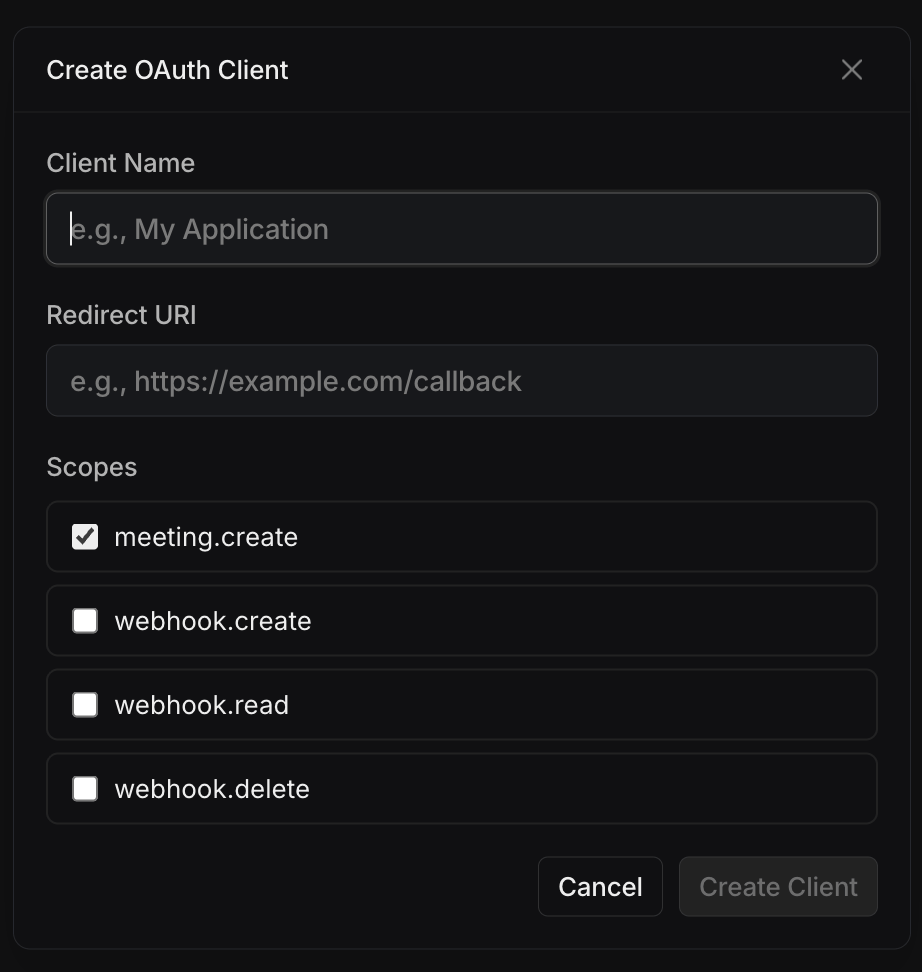
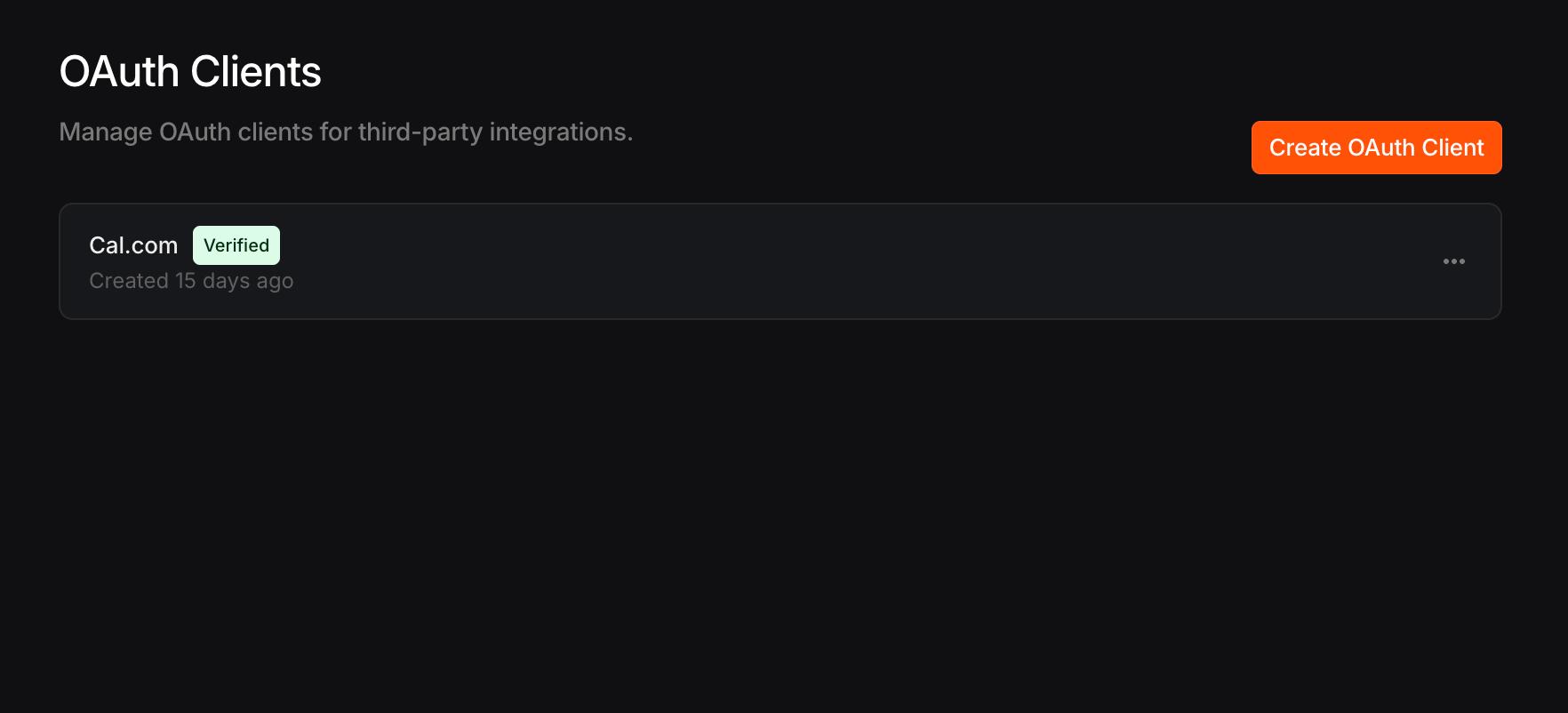 Click **Create OAuth Client** and fill in the required fields:
| Field | Description |
| ---------------- | ---------------------------------------------------------------------------------- |
| **Name** | A display name shown to users during the consent screen |
| **Redirect URI** | The URL where Lyra will send the authorization code after user consent |
| **Scopes** | The permissions your application needs (see [Available Scopes](#available-scopes)) |
Click **Create OAuth Client** and fill in the required fields:
| Field | Description |
| ---------------- | ---------------------------------------------------------------------------------- |
| **Name** | A display name shown to users during the consent screen |
| **Redirect URI** | The URL where Lyra will send the authorization code after user consent |
| **Scopes** | The permissions your application needs (see [Available Scopes](#available-scopes)) |
 After creating the application, you'll receive a **Client ID** and **Client Secret**.
The Client Secret is only shown once. Store it securely — Lyra only keeps a hash of the secret.
## Available Scopes
Scopes control what your application can do on behalf of the user. Request only the scopes you need.
| Scope | Description |
| ---------------- | ------------------------------------ |
| `meeting.create` | Create meetings on the user's behalf |
| `webhook.create` | Register webhook endpoints |
| `webhook.read` | List webhook endpoints |
| `webhook.delete` | Delete webhook endpoints |
## Authorization Flow
The OAuth flow has three steps: redirect the user, receive the authorization code, then exchange it for tokens.
### 1. Redirect the User to Lyra
Send the user to the Lyra authorization page with your application's parameters:
```
https://app.lyra.so/oauth/authorize
?client_id=YOUR_CLIENT_ID
&redirect_uri=https://yourapp.com/callback
&scope=meeting.create webhook.read
&response_type=code
&state=RANDOM_STATE_VALUE
```
| Parameter | Required | Description |
| --------------- | ----------- | ---------------------------------------------------------------------------- |
| `client_id` | Yes | Your application's Client ID |
| `redirect_uri` | Yes | Must exactly match the redirect URI registered with your application |
| `scope` | Yes | Space-separated list of requested scopes |
| `response_type` | Yes | Must be `code` |
| `state` | Recommended | An opaque value to prevent CSRF attacks. Returned unchanged in the callback. |
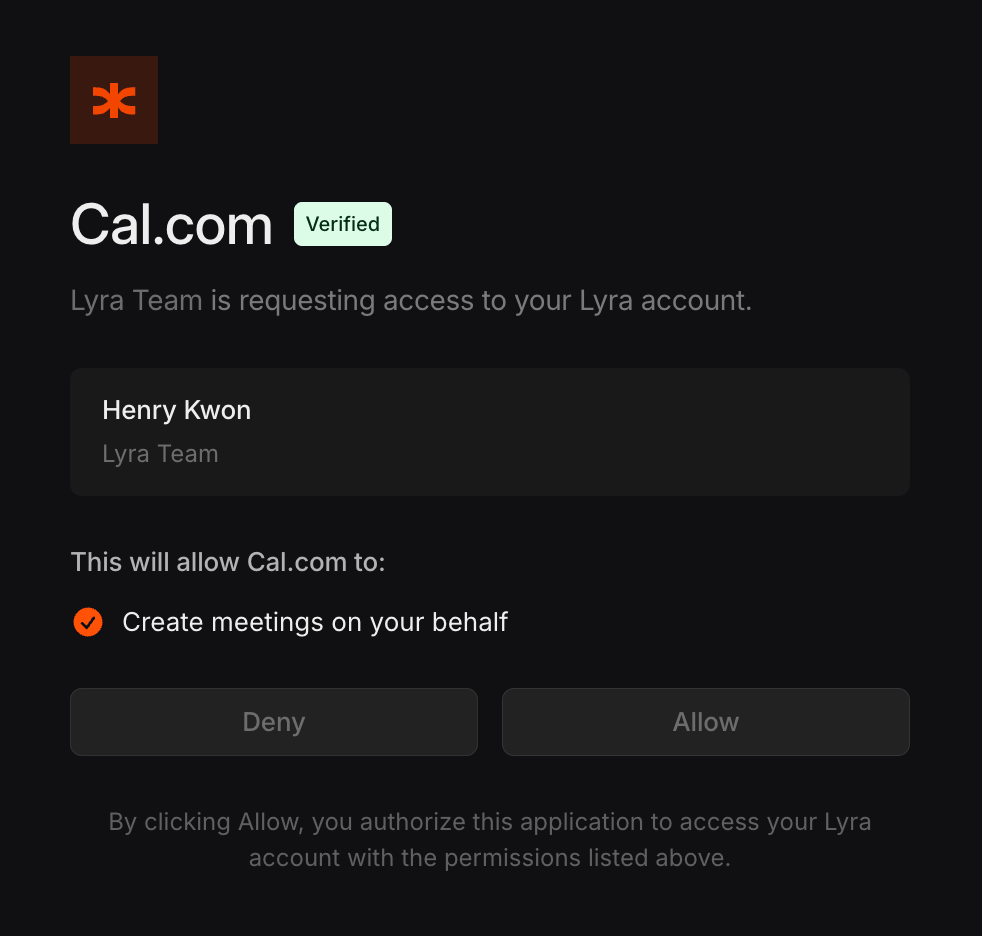
The user will see a consent screen showing your application name and the requested permissions.
After creating the application, you'll receive a **Client ID** and **Client Secret**.
The Client Secret is only shown once. Store it securely — Lyra only keeps a hash of the secret.
## Available Scopes
Scopes control what your application can do on behalf of the user. Request only the scopes you need.
| Scope | Description |
| ---------------- | ------------------------------------ |
| `meeting.create` | Create meetings on the user's behalf |
| `webhook.create` | Register webhook endpoints |
| `webhook.read` | List webhook endpoints |
| `webhook.delete` | Delete webhook endpoints |
## Authorization Flow
The OAuth flow has three steps: redirect the user, receive the authorization code, then exchange it for tokens.
### 1. Redirect the User to Lyra
Send the user to the Lyra authorization page with your application's parameters:
```
https://app.lyra.so/oauth/authorize
?client_id=YOUR_CLIENT_ID
&redirect_uri=https://yourapp.com/callback
&scope=meeting.create webhook.read
&response_type=code
&state=RANDOM_STATE_VALUE
```
| Parameter | Required | Description |
| --------------- | ----------- | ---------------------------------------------------------------------------- |
| `client_id` | Yes | Your application's Client ID |
| `redirect_uri` | Yes | Must exactly match the redirect URI registered with your application |
| `scope` | Yes | Space-separated list of requested scopes |
| `response_type` | Yes | Must be `code` |
| `state` | Recommended | An opaque value to prevent CSRF attacks. Returned unchanged in the callback. |
The user will see a consent screen showing your application name and the requested permissions.
 ### 2. Receive the Authorization Code
After the user approves, Lyra redirects to your `redirect_uri` with an authorization code:
```
https://yourapp.com/callback?code=AUTHORIZATION_CODE&state=RANDOM_STATE_VALUE
```
If the user denies the request, the redirect includes an error:
```
https://yourapp.com/callback?error=access_denied&state=RANDOM_STATE_VALUE
```
Authorization codes expire after **10 minutes** and can only be used once.
### 3. Exchange the Code for Tokens
Make a server-side `POST` request to the token endpoint to exchange the authorization code for an access token and refresh token.
```bash cURL theme={null}
curl -X POST "https://app.lyra.so/api/oauth/token" \
-H "Content-Type: application/x-www-form-urlencoded" \
-d "grant_type=authorization_code" \
-d "code=AUTHORIZATION_CODE" \
-d "client_id=YOUR_CLIENT_ID" \
-d "client_secret=YOUR_CLIENT_SECRET" \
-d "redirect_uri=https://yourapp.com/callback"
```
```json JSON Body (alternative) theme={null}
POST https://app.lyra.so/api/oauth/token
Content-Type: application/json
{
"grant_type": "authorization_code",
"code": "AUTHORIZATION_CODE",
"client_id": "YOUR_CLIENT_ID",
"client_secret": "YOUR_CLIENT_SECRET",
"redirect_uri": "https://yourapp.com/callback"
}
```
The response includes both tokens:
```json theme={null}
{
"access_token": "lyra_oauth_abc123...",
"refresh_token": "lyra_rt_def456...",
"token_type": "bearer",
"expires_in": 3600,
"scope": "meeting.create webhook.read"
}
```
| Field | Description |
| --------------- | --------------------------------------------------------------- |
| `access_token` | Use this as a Bearer token to call the Lyra API |
| `refresh_token` | Use this to get a new access token when the current one expires |
| `expires_in` | Access token lifetime in seconds (1 hour) |
| `scope` | The scopes granted by the user |
## Using OAuth Tokens
Pass the access token as a Bearer token in the `Authorization` header, just like an API key:
```bash theme={null}
curl -X POST "https://app.lyra.so/api/v1/meeting" \
-H "Authorization: Bearer lyra_oauth_abc123..." \
-H "Content-Type: application/json" \
-d '{"title": "Team standup"}'
```
If the token lacks a required scope, you'll receive a `403` response:
```json theme={null}
{
"error": "Insufficient scope. Required: meeting.create"
}
```
## Refreshing Tokens
Access tokens expire after **1 hour**. Use the refresh token to obtain a new access token without requiring the user to re-authorize.
```bash theme={null}
curl -X POST "https://app.lyra.so/api/oauth/token" \
-H "Content-Type: application/x-www-form-urlencoded" \
-d "grant_type=refresh_token" \
-d "refresh_token=lyra_rt_def456..." \
-d "client_id=YOUR_CLIENT_ID" \
-d "client_secret=YOUR_CLIENT_SECRET"
```
The response has the same format as the initial token exchange, including a **new refresh token**:
```json theme={null}
{
"access_token": "lyra_oauth_new_token...",
"refresh_token": "lyra_rt_new_refresh...",
"token_type": "bearer",
"expires_in": 3600,
"scope": "meeting.create webhook.read"
}
```
Lyra uses **refresh token rotation** — each refresh token can only be used once. Always store the new refresh token from the response, as the previous one is immediately revoked.
## Token Lifetimes
| Token | Lifetime |
| ------------------ | ---------- |
| Authorization code | 10 minutes |
| Access token | 1 hour |
| Refresh token | 30 days |
## Error Responses
The token endpoint returns standard OAuth error codes:
| Error | Description |
| ------------------------ | ----------------------------------------------------------- |
| `invalid_request` | Missing required parameters |
| `invalid_grant` | Authorization code is invalid, expired, or already used |
| `invalid_client` | Client ID or secret is incorrect |
| `unsupported_grant_type` | Only `authorization_code` and `refresh_token` are supported |
| `invalid_scope` | Requested scope is invalid or not allowed for this client |
| `access_denied` | The user denied the authorization request |
### 2. Receive the Authorization Code
After the user approves, Lyra redirects to your `redirect_uri` with an authorization code:
```
https://yourapp.com/callback?code=AUTHORIZATION_CODE&state=RANDOM_STATE_VALUE
```
If the user denies the request, the redirect includes an error:
```
https://yourapp.com/callback?error=access_denied&state=RANDOM_STATE_VALUE
```
Authorization codes expire after **10 minutes** and can only be used once.
### 3. Exchange the Code for Tokens
Make a server-side `POST` request to the token endpoint to exchange the authorization code for an access token and refresh token.
```bash cURL theme={null}
curl -X POST "https://app.lyra.so/api/oauth/token" \
-H "Content-Type: application/x-www-form-urlencoded" \
-d "grant_type=authorization_code" \
-d "code=AUTHORIZATION_CODE" \
-d "client_id=YOUR_CLIENT_ID" \
-d "client_secret=YOUR_CLIENT_SECRET" \
-d "redirect_uri=https://yourapp.com/callback"
```
```json JSON Body (alternative) theme={null}
POST https://app.lyra.so/api/oauth/token
Content-Type: application/json
{
"grant_type": "authorization_code",
"code": "AUTHORIZATION_CODE",
"client_id": "YOUR_CLIENT_ID",
"client_secret": "YOUR_CLIENT_SECRET",
"redirect_uri": "https://yourapp.com/callback"
}
```
The response includes both tokens:
```json theme={null}
{
"access_token": "lyra_oauth_abc123...",
"refresh_token": "lyra_rt_def456...",
"token_type": "bearer",
"expires_in": 3600,
"scope": "meeting.create webhook.read"
}
```
| Field | Description |
| --------------- | --------------------------------------------------------------- |
| `access_token` | Use this as a Bearer token to call the Lyra API |
| `refresh_token` | Use this to get a new access token when the current one expires |
| `expires_in` | Access token lifetime in seconds (1 hour) |
| `scope` | The scopes granted by the user |
## Using OAuth Tokens
Pass the access token as a Bearer token in the `Authorization` header, just like an API key:
```bash theme={null}
curl -X POST "https://app.lyra.so/api/v1/meeting" \
-H "Authorization: Bearer lyra_oauth_abc123..." \
-H "Content-Type: application/json" \
-d '{"title": "Team standup"}'
```
If the token lacks a required scope, you'll receive a `403` response:
```json theme={null}
{
"error": "Insufficient scope. Required: meeting.create"
}
```
## Refreshing Tokens
Access tokens expire after **1 hour**. Use the refresh token to obtain a new access token without requiring the user to re-authorize.
```bash theme={null}
curl -X POST "https://app.lyra.so/api/oauth/token" \
-H "Content-Type: application/x-www-form-urlencoded" \
-d "grant_type=refresh_token" \
-d "refresh_token=lyra_rt_def456..." \
-d "client_id=YOUR_CLIENT_ID" \
-d "client_secret=YOUR_CLIENT_SECRET"
```
The response has the same format as the initial token exchange, including a **new refresh token**:
```json theme={null}
{
"access_token": "lyra_oauth_new_token...",
"refresh_token": "lyra_rt_new_refresh...",
"token_type": "bearer",
"expires_in": 3600,
"scope": "meeting.create webhook.read"
}
```
Lyra uses **refresh token rotation** — each refresh token can only be used once. Always store the new refresh token from the response, as the previous one is immediately revoked.
## Token Lifetimes
| Token | Lifetime |
| ------------------ | ---------- |
| Authorization code | 10 minutes |
| Access token | 1 hour |
| Refresh token | 30 days |
## Error Responses
The token endpoint returns standard OAuth error codes:
| Error | Description |
| ------------------------ | ----------------------------------------------------------- |
| `invalid_request` | Missing required parameters |
| `invalid_grant` | Authorization code is invalid, expired, or already used |
| `invalid_client` | Client ID or secret is incorrect |
| `unsupported_grant_type` | Only `authorization_code` and `refresh_token` are supported |
| `invalid_scope` | Requested scope is invalid or not allowed for this client |
| `access_denied` | The user denied the authorization request |